Google's agent-first development platform that autonomously plans, codes, tests, and deploys full applications from a single prompt — no step-by-step hand-holding required.
Visit Google Antigravity ↗Google Antigravity
💰 Pricing
Free in Public Preview
Google Antigravity is free for individuals in its current public preview. It includes generous rate limits on Gemini 3.5 Flash plus full support for Claude Sonnet 4.5 and GPT-OSS models — all at no cost during the preview period. Cross-platform: macOS, Windows, and Linux.
→ Download at antigravity.google/download
⚡ Key Features & Use Cases
✅ Pros
- 🚀Fully autonomous — agents plan, build, test, and fix without constant supervision
- 🌐Live browser testing built in — the agent navigates and validates your app for you
- 🤖Multi-model support: Gemini 3.5 Flash, Claude Sonnet 4.5, and GPT-OSS
- 🆓Completely free for individuals in public preview with generous limits
- 📋Artifact system (screenshots, walkthroughs) makes it easy to review agent work at a glance
⚠️ Cons
- 🧪Still in public preview — some rough edges and occasional agent errors expected
- 🔒No enterprise pricing or on-premise option announced yet
- 📚Learning curve for developers used to traditional IDE workflows
- ⚡Heavy tasks can be slow as agents iterate across editor, terminal, and browser

Prabhu Kumar Dasari
Senior Unity XR Developer · AllInOneAICenter
Antigravity is the first AI dev tool that genuinely feels like having a junior developer on call 24/7 — one who can spin up a browser, click through your app, find the bug, and fix it, all while you're working on something else. The Manager Surface is the real innovation here: it's not a chatbot sidebar, it's a proper async workspace for agents.
For solo developers or small teams tackling repetitive feature work, this is a serious productivity multiplier. The fact that it supports Claude Sonnet 4.5 alongside Gemini means you can pick the model that fits the task — that kind of model optionality is rare in an IDE. My only hesitation is the preview stability; for production-critical work I'd still verify agent output carefully before shipping.
🚀 Getting Started
- Download Antigravity Go to antigravity.google/download and install for macOS, Windows, or Linux. Sign in with your Google account — no waitlist, it's in public preview now.
- Choose your mode: Editor or Manager The Editor View gives you a familiar AI-powered IDE with tab completions and inline commands. The Manager Surface is where you spawn autonomous agents — pick whichever matches your task.
- Delegate your first task to an agent In the Manager Surface, describe a complete task: "Build a login page with JWT auth, add unit tests, open it in the browser and verify the form submits correctly." Watch the agent plan, write code, test it live, and report back with screenshots.
- Review Artifacts, not raw logs When the agent finishes, it produces Artifacts — task lists, implementation plans, browser recordings. Review these at a glance and leave inline feedback if something needs adjusting, just like commenting on a doc.
💡 Real-World Examples
Example 1
Scenario: A solo developer needs to add a fully tested user authentication flow to an existing Node.js app — without stopping their current work.
Prompt / Action:
In the Manager Surface: "Add JWT-based login and signup to this Node.js Express app. Write the routes, middleware, and tests. Open the app in the browser, try signing up with a test account, and confirm the token is returned correctly."Result: The agent writes the auth code, runs the server, opens Chrome, submits the signup form, confirms the JWT response, and delivers a screenshot Artifact — the developer never left their current task.
Example 2
Scenario: A startup team uses Antigravity to rapidly iterate on a landing page UI based on a design brief — cutting design-to-code time by 80%.
Prompt / Action:
"Rebuild the hero section of this landing page: dark background, teal accent, animated gradient headline, and a sticky CTA button. Screenshot the result and flag any layout issues at mobile breakpoints."Result: Antigravity rewrites the HTML/CSS, opens the page in a browser, resizes to mobile, finds a button overflow issue, fixes it, and returns a before/after screenshot Artifact — no designer-developer back-and-forth needed.
Example 3
Scenario: A developer offloads a long-running bug investigation — a flaky API integration that only fails under load — to a background Antigravity agent.
Prompt / Action:
"Reproduce the race condition in the /api/orders endpoint that appears under concurrent requests. Write a stress test, identify the failing line, implement a fix, and re-run the test to confirm it passes."Result: The agent reproduces the bug with a custom stress test, traces it to a missing async lock, applies the fix, reruns the tests green, and surfaces a walkthrough Artifact — the developer picks up the summary in minutes.
Example 4
Scenario: An indie game developer uses Antigravity to scaffold a full Three.js mini-game from a single creative prompt and have it playable in the browser within minutes.
Prompt / Action:
"Build a browser-based asteroid shooter in Three.js — player ship, drifting asteroids, laser fire on click, score counter, and a game-over screen. Open it in the browser and confirm keyboard controls work."Result: Antigravity scaffolds the full Three.js project, launches it in a browser, tests keyboard input and collision detection, fixes two rendering bugs it discovers, and delivers a playable game Artifact link — under 8 minutes total.
Example 5 · User Submitted — Built With Antigravity
Scenario: A developer used Antigravity to build VidGen Studio — a full production-ready AI video generator with a Python FastAPI TTS backend, multi-layer canvas compositor, neural voice synthesis, lip-syncing character overlay, and H.264 MP4 export — from three structured prompts, no prior scaffolding.
Prompts Used (3-part build):
"Build a Python FastAPI backend that provides neural TTS integration. The API should have /api/voices to return high-quality neural voices from the edge-tts engine, and a /api/generate-audio endpoint that accepts script text and voice profiles as JSON, generates speech asynchronously, and caches the outputs as local MP3 files inside a generated/ directory. Write a resilient tts_engine.py wrapper that uses asyncio to execute edge-tts and falls back to pyttsx3 or gtts in case network connection fails."

"Implement a premium visual player in the DOM and canvas exporter. The HTML preview screen should have a permanent #common-bg element in the back and two overlaying .preview-bg classes for scene backdrops. When a scene visual backdrop is Contain, the custom overlay is centered, letting the base preset background show on the margins. When it is Cover, it covers the container. In the canvas recorder frame drawing loop, clear the frame, draw the active base background preset first, then overlay the scene's custom backdrop on top using its transition opacity and fit rules."

"Create a 3-column workspace using vanilla CSS with fully-constrained heights (height: 100vh - header). Write .panel-body to have flex: 1 and overflow-y: auto. To prevent WebKit/Safari flexbox scrolling bugs, set min-height: 0 and height: 0 on .panel-body. Add flex-shrink: 0 on .scene-card and .audio-card to ensure they never crush or shrink."
Result: Antigravity built the complete VidGen Studio application — Script Studio panel, Audio Studio with real-time waveform, Scene Composer with live preview, timeline stacking, and one-click MP4 export — across three agent runs. The full tutorial was documented from the Artifact output and the final video was published to YouTube Shorts.
🎬 See It In Action — YouTube Short
Watch Antigravity build VidGen Studio from scratch — a full AI video generator with neural voices, multi-layer canvas, lip-sync character, and MP4 export. Three prompts. One agent run. Zero boilerplate.
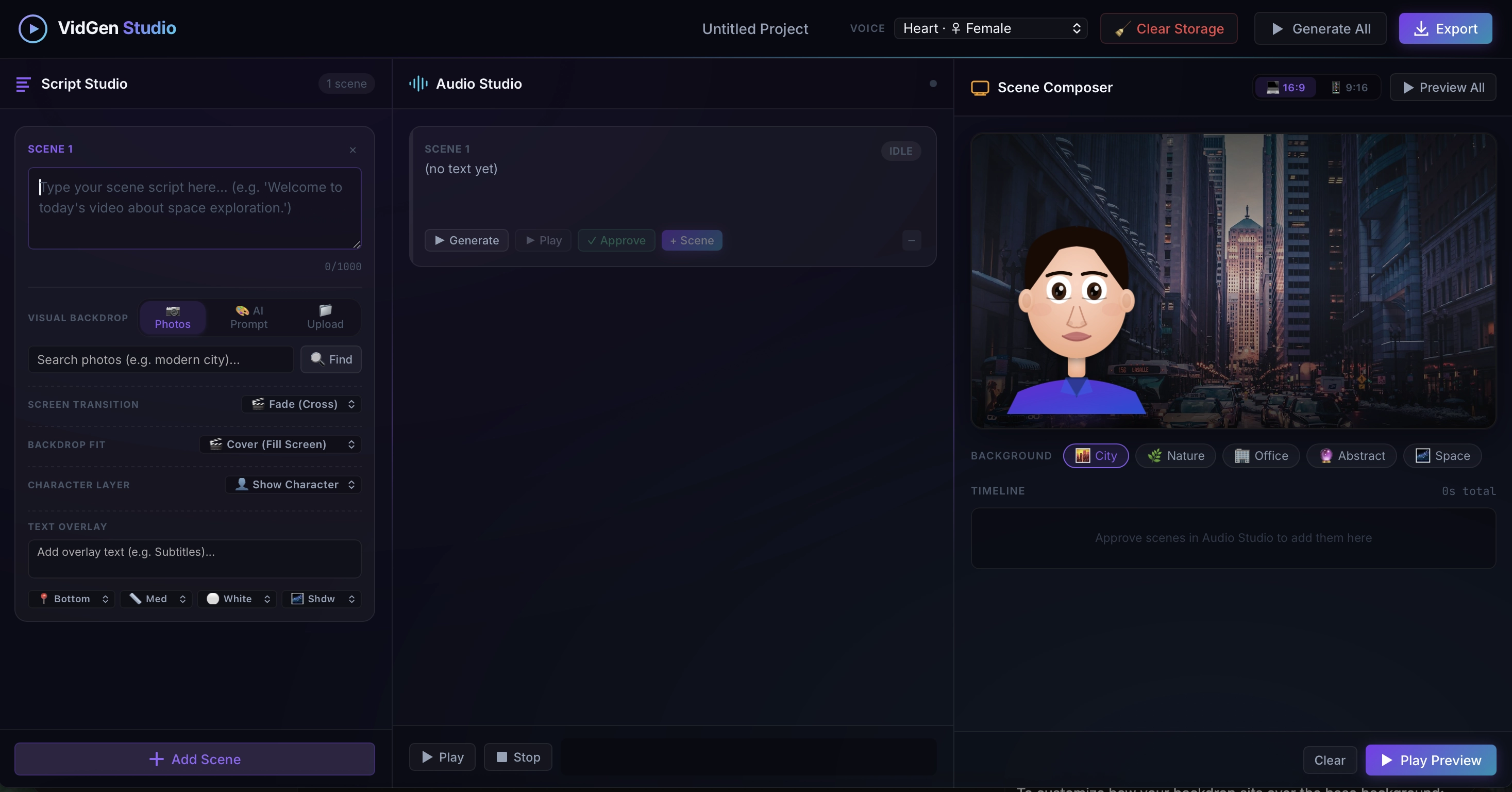
↑ VidGen Studio UI — Script Studio (left) · Audio Studio (centre) · Scene Composer with 9:16 preview (right). Built entirely by Antigravity from 3 prompts.
VidGen Studio · Built with Google Antigravity · 3 prompts → full production app
⚠️ Note: Lip-sync for the character is not yet integrated in this version of the video — coming in a future update.
❓ Frequently Asked Questions
🔄 Top Alternatives
If Antigravity isn't the right fit, these alternatives are worth exploring:
- → Google Gemini — Gemini's chat interface for research and Workspace tasks
- → Claude — Anthropic's model, also available inside Antigravity
- → ChatGPT — OpenAI's assistant with coding capabilities via GPT-4o