VR Learning Studio — AI-Powered Enterprise Communication Training Platform
A multimodal AI platform that evaluates speech, behaviour, and storytelling in VR — and delivers automated performance reports. Built end-to-end for a global technology consultancy.
What Was Built
The VR Learning Studio is an end-to-end AI-powered enterprise training platform that evaluates how professionals communicate — their speech, their behaviour in front of a virtual audience, and the quality of their data storytelling. It runs on VR headsets and mobile devices, uses five AI services in a sequential processing pipeline, and required building every layer from scratch: OAuth authentication, VR experience, AI pipeline, evaluation engine, PDF report generation, and automated email delivery.
Most enterprise training software evaluates what you know. This platform evaluates how you communicate it — a fundamentally harder problem. The combination of VR simulation, real-time speech analysis, NLP emotion detection, and Google Cloud AutoML scoring makes it genuinely unique in the enterprise communication training space.
The Problem It Solved
Large enterprises employ tens of thousands of professionals whose effectiveness depends heavily on communication skills — presenting data to clients, leading team meetings, handling difficult stakeholder conversations, telling compelling data stories. Traditional training for these skills is expensive (external coaches), inconsistent (different trainers give different feedback), and unscalable at enterprise level.
The VR Learning Studio addressed all three simultaneously. AI coaching is consistent — the same evaluation criteria apply to every user regardless of location or seniority. VR delivery is scalable — any employee with a headset or mobile device can train at any time without scheduling a session. And automated PDF reporting makes the feedback detailed and immediate, without a human coach needing to review every session.
How the Experience Worked
Users entered the platform through a secure OAuth 2.0 login — implemented manually without SDK, handling the full authorization code flow, token exchange, and session management from scratch. Once authenticated, they had two training modes:
Data Storytelling Mode: The user presents in a photorealistic virtual conference room to an audience of avatars. They must speak clearly, maintain eye contact with the virtual audience, move naturally, and structure their presentation with a clear narrative — Setting, Twist, Action. The VR environment tracks everything: voice input via microphone, head rotation and gaze direction, physical movement, and interaction choices.
Story-Based Assessment Mode: Built using Dialogflow as a branching narrative engine, this mode puts users in scenario-based conversations — handling a difficult client question, managing a team conflict, responding to unexpected data challenges. Each user choice triggers a Dialogflow intent, loads the next story branch, and records the response for AI analysis.
The AI Processing Pipeline — Five Stages
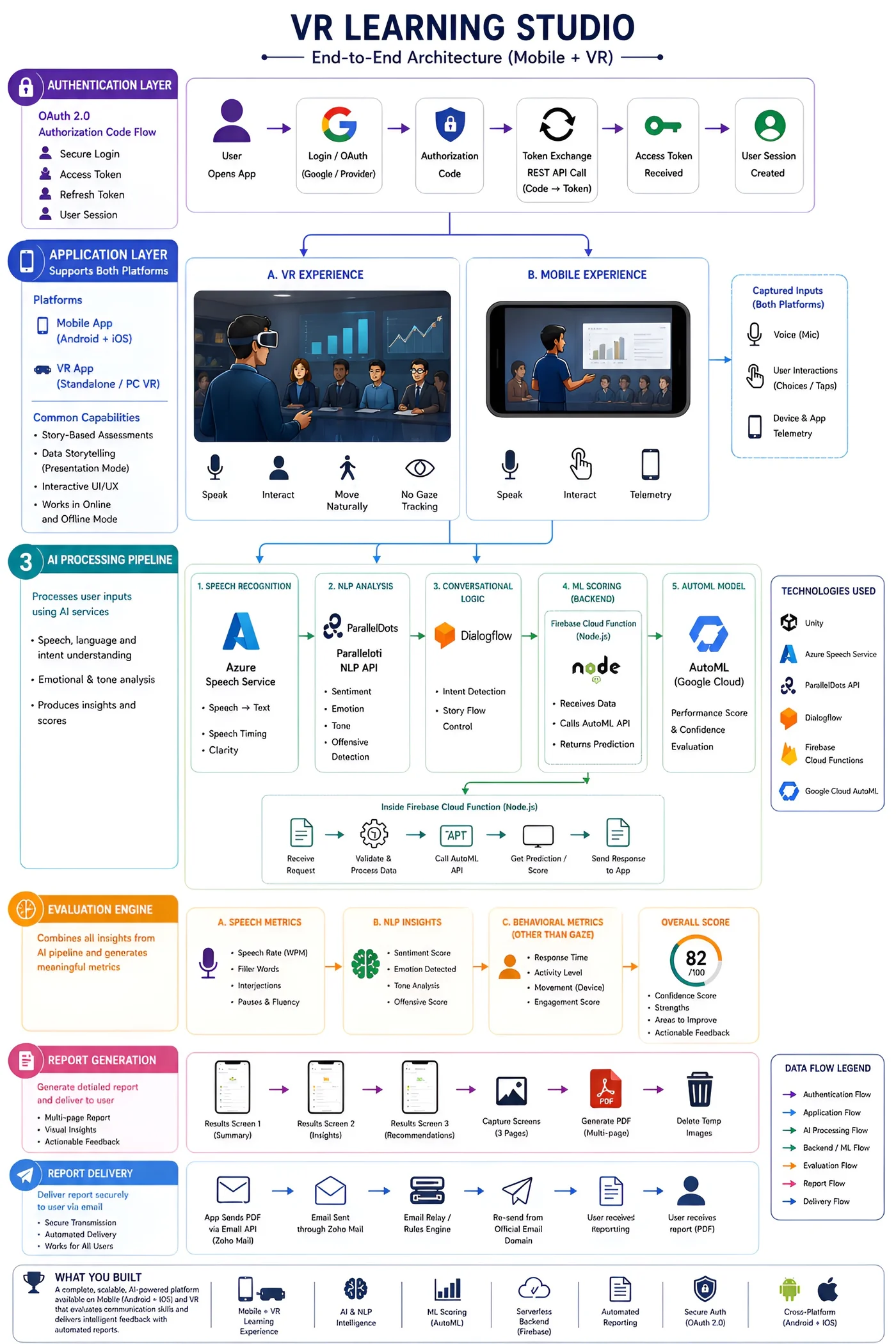
Every session — whether VR or mobile — passes through the same five-stage AI pipeline:
The Evaluation Engine — Three Dimensions
The evaluation engine combines outputs from the full AI pipeline into a structured assessment across three dimensions:
- Words per minute (WPM)
- Filler words count
- Interjections
- Pauses and fluency
- Sentiment score
- Emotion detected
- Tone analysis
- Offensive score
- Response time
- Activity level
- Movement score
- Engagement score
Combined, these produce an overall score out of 100 with a confidence score, identified strengths, areas to improve, and actionable feedback. The score appears on the results screen inside the app at the end of each session.
Report Generation and Delivery
Every session automatically generates a detailed PDF performance report — no manual intervention required. The process:
- Three results screens are captured as screenshots inside Unity (Summary · Insights · Recommendations)
- Screenshots are combined into a multi-page PDF using iTextSharp
- Temporary images are deleted
- PDF is sent via Zoho Mail to a relay system
- Internal email rules engine re-sends from the official email domain
- User receives a professional performance report in their inbox automatically
This end-to-end automated delivery — from VR session to inbox without any human step — was one of the most technically complex parts of the system. Getting Unity to generate PDFs, pass them through a multi-step email relay, and deliver from an official corporate domain required careful orchestration across multiple services.
Full Architecture Diagram
The complete end-to-end system architecture — all six layers from authentication to delivery — is shown in the interactive diagram below:
VR LEARNING STUDIO
Authorization Code Flow
- Secure Login
- Access Token
- Refresh Token
- User Session
(Android + iOS)
(Standalone / PC VR)
- Story-Based Assessments
- Data Storytelling (Presentation Mode)
- Interactive UI/UX
- Works Online and Offline Mode
A. VR Experience
Speak
Interact
Move Naturally
Gaze Tracking
B. Mobile Experience
Speak
Interact
Telemetry
No Gaze
- Speech, language and intent understanding
- Emotional & tone analysis
- Provides insights and scores
- Speech → Text
- Speech Timing
- Clarity
- Sentiment
- Emotion
- Tone
- Offensive Detection
- Intent Detection
- Story Flow Control
- Receives Data
- Calls AutoML API
- Returns Prediction
A. Speech Metrics
- Speech Rate (WPM)
- Filler Words
- Interjections
- Pauses & Fluency
B. NLP Insights
- Sentiment Score
- Emotion Detected
- Tone Analysis
- Offensive Score
C. Behavioral Metrics
- Response Time
- Activity Level
- Movement (Device)
- Engagement Score
Overall Score
- Confidence Score
- Strengths
- Areas to Improve
- Actionable Feedback
- Multi-page Report
- Visual Insights
- Actionable Feedback
- Secure Transmission
- Automated Delivery
- Works for All Users
Technologies Used
Data Flow Legend
Key Highlights
- Cross-platform: Mobile + VR
- AI multi-modal analysis
- Serverless Firebase backend
- Automated PDF reporting
- Secure OAuth 2.0 auth
- Works online and offline
What Made This Project Technically Significant
Most XR projects integrate one or two external services. This system integrated six: Azure Speech, ParallelDots NLP, Dialogflow, Firebase Cloud Functions, Google Cloud AutoML, and Zoho Mail — all working in sequence within a single evaluation flow. Each service has its own authentication, its own API contract, its own failure modes, and its own latency characteristics.
Building a system where five AI services process data sequentially and the combined output drives a real-time evaluation score — with graceful handling when any service is slow or unavailable — is a genuinely hard distributed systems problem. Doing it inside a Unity VR application, on standalone headsets with intermittent connectivity, added additional constraints around offline capability and data synchronisation.
The OAuth 2.0 manual implementation is also worth noting. Using an OAuth SDK handles the complexity for you. Implementing the full authorization code flow manually — token exchange, refresh token management, session handling — requires understanding the protocol deeply and building error handling for every edge case. That decision gave the system more control over the authentication experience and fewer third-party dependencies, at the cost of significantly more development work.
Unity (VR + Mobile)
Azure Speech Service
ParallelDots API
Dialogflow
Firebase Cloud Functions (Node.js)
Google Cloud AutoML
OAuth 2.0 (manual)
Zoho Mail + Email Relay
iTextSharp PDF
Android + iOS