🗺️ Google Maps · Navigation AI
How Google Maps Predicts Traffic That Hasn't Happened Yet
How does Google Maps predict traffic?
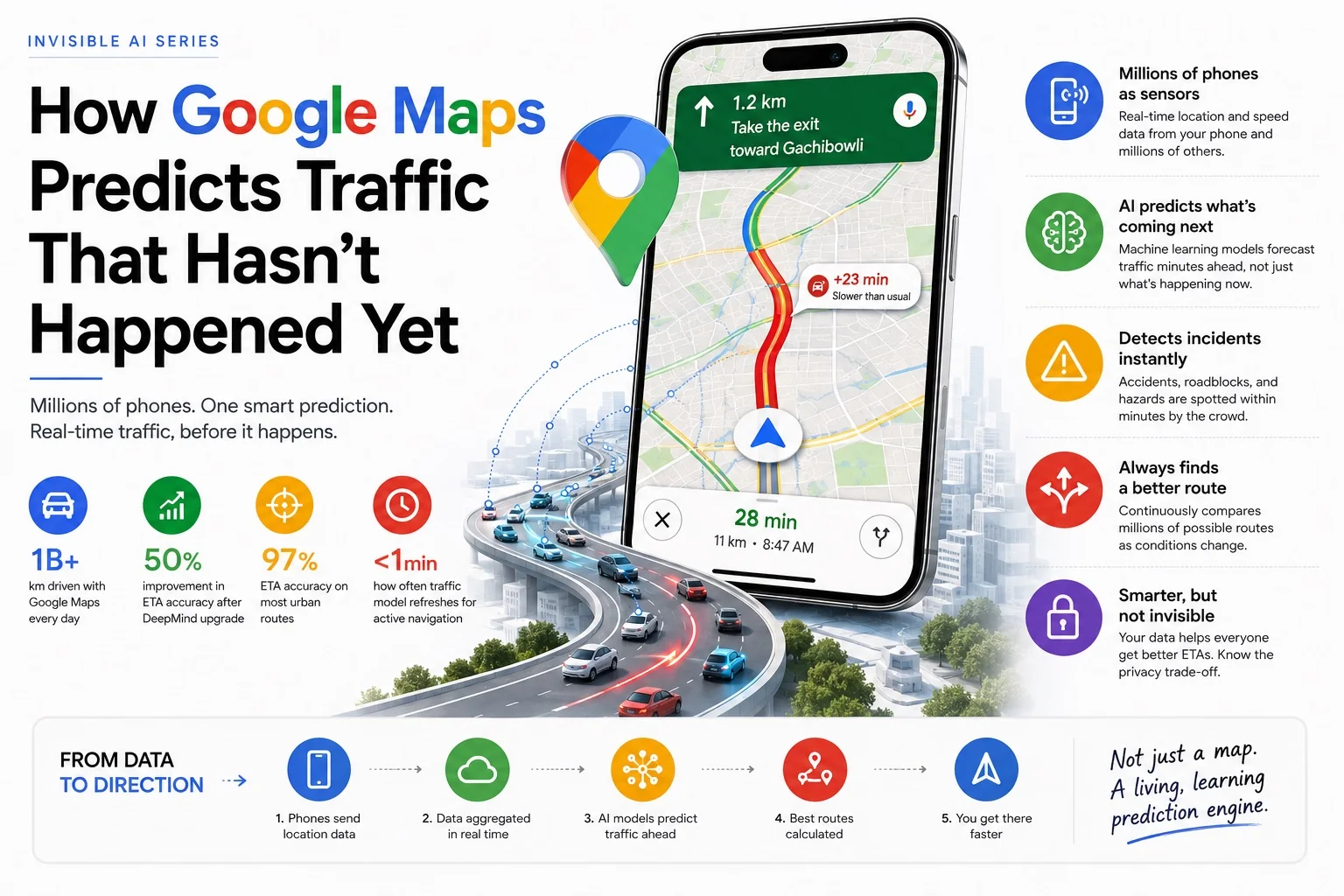
Google Maps predicts traffic using real-time GPS data from millions of smartphones, historical traffic patterns, a DeepMind-trained graph neural network, incident reports from Waze, weather signals, and event data. It layers live crowd data on a historical baseline — then uses propagation modelling to predict where congestion will be when you arrive, not just where it is now. Google Maps ETA accuracy reaches 97% on well-mapped urban routes.

| Signal | Source | What It Does |
|---|---|---|
| Real-time GPS | Smartphones (yours included) | Detects current road speeds — the live crowd sensor layer |
| Historical traffic patterns | Years of aggregated route data | Establishes the baseline ETA by time, day, and season |
| Graph Neural Network (DeepMind) | AI model — trained on billions of trips | Predicts how congestion propagates across the road graph |
| Waze incident reports | Crowdsourced user reports | Detects accidents, hazards, closures within minutes |
| Event & calendar data | Sports fixtures, concerts, public holidays | Adjusts predictions before major crowd events |
| Weather data | Weather services API | Improves ETA accuracy in rain, fog, and extreme heat |
- It's not reading historical data — it's reading right now
- Your phone is a sensor in the Google Maps traffic network
- How the Google Maps traffic prediction algorithm works
- How it detects accidents before the news does
- The DeepMind upgrade that improved ETA accuracy by 50%
- Why Indian roads are a hard problem for traffic AI
- The privacy trade-off you make every time you open the app
- Why Google Maps ETA is sometimes wrong
- Interactive traffic map — Hyderabad hotspots
- Google Maps vs Waze: traffic prediction compared
- Frequently asked questions
I drive to a client site in Hyderabad maybe twice a month. Same route, same general time window. And every single time, Google Maps gives me a slightly different suggested route. Sometimes it sends me through Gachibowli when I'd normally avoid it. Sometimes it routes me through roads I didn't know existed. Sometimes it reroutes me mid-drive with no obvious reason — and I only realise why 10 minutes later when I see the traffic I would have hit.
For a long time I assumed it was just checking some live traffic feed, like a smarter version of the old highway information boards. It's not. What's actually happening is considerably more interesting — and considerably more dependent on the phone in my pocket.
It's not reading historical data — it's reading right now
Most people assume Google Maps traffic works like this: Google collected traffic data for years, built up patterns ("Tuesday 8am on this road is always slow"), and just plays those patterns back when you navigate.
That's part of it. But if that were all it did, it couldn't tell you about the accident that happened 12 minutes ago. It couldn't reroute you away from a burst water pipe that closed a lane an hour before you left. It couldn't warn you that today's traffic is 40% worse than usual for a Tuesday because there's a cricket match ending nearby.
🔑 The key distinction: Google Maps uses historical patterns as a baseline — then continuously corrects that baseline with real-time data from millions of GPS sources. The prediction you see is not "what Tuesday usually looks like." It's "what Tuesday usually looks like, adjusted for what is actually happening on this specific Tuesday right now."
Your phone is a sensor in the Google Maps traffic network
Here's the part that surprised me most when I first understood it properly. The traffic data Google Maps shows you is not coming from roadside sensors or traffic cameras. It's coming from phones. Phones like yours.
When you have Google Maps open — or even just when you have location history enabled on your Android phone — your device is periodically sending anonymous location signals back to Google. Your phone's GPS registers your position, your speed, and your direction of travel. Aggregate this across millions of phones on the same road simultaneously and you get a real-time speed reading for every road segment.
If 200 phones that should be moving at 60 km/h on the outer ring road are suddenly all moving at 8 km/h, Google knows there's a slowdown — before any traffic authority has reported it, before any news channel covers it, before the jam even has a name. The data is the crowd. The crowd is the sensor.
This is what's called crowdsourced traffic data, and it's why Google Maps traffic accuracy improved dramatically after 2013 when smartphone penetration crossed a critical threshold. Before smartphones were ubiquitous, traffic data was sparse and delayed. Now it's dense, real-time, and covering roads that would never justify installing a physical sensor.
How the Google Maps traffic prediction algorithm works
Real-time speed data from phones tells you what's happening right now. But your ETA depends on what's going to happen over the next 20–40 minutes as you move through multiple road segments. That's a prediction problem, not a measurement problem — and this is where machine learning comes in.
Google Maps' prediction model is built on several layers working together:
Historical baseline
Years of speed data for every road segment, broken down by time of day, day of week, and season. The model knows that the stretch of road between Jubilee Hills and Banjara Hills is reliably slow between 8:30–9:30am on weekdays — and builds that expectation into every ETA calculated during that window.
Live GPS correction
The real-time crowd data overlaid on the historical baseline. If today is running 25% slower than the historical baseline for a Monday, the model adjusts every downstream ETA accordingly — not just for the segment where the slowdown is happening, but for the ripple effect it will have on connecting roads as traffic redistributes.
Propagation prediction
This is the clever bit. Traffic jams don't stay still — they move, grow, and dissolve in predictable ways. The model was trained on millions of traffic events to recognise these patterns. A slowdown that started 10 minutes ago at a specific point will typically reach a certain length and then clear in a certain window. The ETA you're shown is predicting where the jam will be when you arrive — not where it is now.
Event and contextual signals
Public holidays, large events (cricket matches, concerts, festivals), weather data, school schedules — all of these are fed into the model as context signals. If there's an IPL match at the Rajiv Gandhi International Cricket Stadium tonight, Google Maps already knows the roads around it will be congested two hours before the match ends and adjusts route suggestions accordingly.
How it detects accidents before the news does
This is the one that still impresses me. Open Google Maps on a major highway and you'll sometimes see a small icon marking an accident — sometimes within 5–7 minutes of it happening, long before any official traffic advisory.
The detection works through two complementary signals. First, the speed signal: if a section of road that normally flows at highway speeds suddenly drops to near-zero and stays there, the anomaly is flagged. Second, user reports: Waze (which Google owns) has a built-in reporting system where users can flag accidents, hazards, police presence, and road closures in real time. Those reports flow into the same model that powers Maps.
Combined, these create something remarkable: a crowd-powered incident detection system that often knows about accidents within minutes of them occurring — simply because dozens of phones slowed to a stop at the same point simultaneously, and someone among them tapped "report incident."
The model also learns to distinguish incident-based slowdowns from routine congestion. Routine jams have a characteristic shape — they build gradually, peak, then clear. Incident-based slowdowns have a different signature: sudden onset, fixed point, often longer-lasting. The model uses these shape differences to decide whether to show a "typical slowdown" notification or an "accident ahead" warning.
The DeepMind upgrade that improved Google Maps ETA accuracy by 50%
When Google brought in its AI research division to fix ETAs
In 2020, Google published research showing they had replaced significant parts of Maps' prediction model with a Graph Neural Network developed by DeepMind — the same AI lab behind AlphaGo and AlphaFold. The results were striking: ETA accuracy improved by up to 50% in cities like Sydney, Tokyo, Jakarta, São Paulo, and several Indian metros. Google's official blog post on AI in Maps and the underlying Google Research paper on graph neural network traffic prediction detail the architecture.
The old model treated each road segment somewhat independently. The Graph Neural Network treats the road network as what it actually is: a connected graph where a slowdown on one road affects speeds on adjacent and downstream roads in complex, non-obvious ways. The model learned these relationships from years of traffic data — and it handles the complexity of real urban road networks far better than rule-based approaches ever could.
When Google Maps gives you an ETA that feels almost eerily accurate, this is the system behind it. Not a lookup table. A neural network modelling the entire road graph simultaneously.
Why Indian roads are a hard problem for Google Maps traffic AI
Most traffic prediction models were built for road networks that behave predictably: lanes are followed, signals are obeyed, pedestrians cross at designated points. Indian roads — especially in cities like Hyderabad, Mumbai, and Delhi — are a different category of problem.
Autorickshaws cut across lanes. Two-wheelers filter through gaps that don't technically exist. U-turns happen at unofficial points. Cows stop traffic on arterial roads in some cities. Road closures from VIP movements happen with 15 minutes' notice. Pothole repairs block a lane for three hours with no advance warning.
What this means for the model: the historical baseline is less reliable in India than in more structured traffic environments. The variance is higher. An "average Monday" in Hyderabad can be 3× slower or 1.5× faster than the historical baseline depending on factors the model may not have signals for.
Google has adapted by leaning more heavily on the real-time signal layer for Indian cities — trusting live GPS data over historical patterns more than it would in, say, London. It's also incorporated local signals: festival calendars, state-specific public holidays, election days (which often create unusual traffic patterns as government vehicles move). The model for India is effectively a different calibration than the model for Germany. Same architecture, different weights, different trust in different signal types.
The privacy trade-off you make every time you open the app
Your location history is the product that makes this possible
Every phone that contributes GPS data to Google Maps' traffic model is also telling Google where it has been. Google's location history features track your home, your workplace, places you visit regularly, and the routes you take between them. This data is used for more than traffic — it informs personalised suggestions, business visit tracking, and advertising across Google's ecosystem. You can turn it off (Settings → Location History in your Google account), but doing so removes your contribution to the crowd-sensor network that makes ETA predictions accurate. It's a genuine trade-off, not a trick.
Most people, including me, decide the trade-off is worth it. The navigation accuracy is genuinely useful. But it's worth making the choice consciously rather than by default — especially if you navigate to places you'd prefer Google didn't know about.
Why Google Maps ETA is sometimes wrong
For all the sophistication, Google Maps ETA predictions fail in predictable ways. Understanding them makes you a smarter user.
New or sudden incidents: The model needs a few minutes of GPS data before it can detect and factor in a fresh incident. If an accident happened 90 seconds ago and your navigation started 60 seconds ago, you may get an optimistic ETA that doesn't yet account for it.
Low-density roads: In areas where few phones are providing GPS data — rural roads, newly developed areas, or roads at unusual hours — the crowd signal is thin. The model falls back on historical data, which may be years old. On such roads, treat the ETA as an estimate, not a prediction.
Mass events ending simultaneously: When a stadium empties or a concert ends, the traffic surge is concentrated and sudden in a way that historical data predicts poorly. The model knows an event is happening, but the exact minute tens of thousands of cars all start at once creates a spike that the propagation model often underestimates.
The map itself is wrong: In rapidly developing areas — which describes large parts of Indian metros — the underlying road data may not reflect recent construction, flyovers that opened last month, or roads that were one-way until last week. The AI is only as accurate as the map it's reasoning about.
Understanding how Google Maps actually works changed how I use it — and made me more forgiving of it. When it reroutes me suddenly, I now know that's usually because the crowd signal just shifted: new data came in that changed the prediction. It's not being capricious. It's updating.
When it's wrong about an ETA in Hyderabad, I now know why: it's working with thinner data on some roads than I'd like, and the variance in Indian traffic makes the historical baseline less trustworthy. I build in a buffer instead of being irritated at an algorithm that's genuinely doing something impressive under difficult conditions.
The most useful thing I can tell you is this: on routes you drive regularly, Google Maps is almost always right. On unfamiliar routes at unusual times, treat the ETA as the starting point of your estimate, not the final word. That's not a failure of the AI — it's just the honest limitation of any prediction system working with incomplete data.
Live & interactive traffic maps
Enter a starting point and destination to see live Google Maps traffic on your route. Type any city, landmark or address — suggestions appear as you type.
📍 Hyderabad hotspot explainer — what the AI model does at each point
This map is an educational visualization — not live traffic. Click each marker to read how the Google Maps prediction algorithm handles that specific road segment.
Google Maps vs Waze: traffic prediction compared
Google acquired Waze in 2013 but kept both apps running independently. They share data pipelines but approach the user experience differently. Understanding the difference helps explain why some users prefer Waze for heavy commute routes.
| Feature | Google Maps | Waze |
|---|---|---|
| Traffic data source | GPS crowdsourcing + historical AI | GPS crowdsourcing + active user reports |
| Incident reporting | Derived from speed anomalies + Waze feed | Real-time user-submitted reports (accidents, police, hazards) |
| ETA algorithm | DeepMind graph neural network | Crowd-weighted speed model |
| Route aggressiveness | Balanced — prefers known roads | Aggressive — frequently uses side streets |
| Police alerts | Limited | Core feature — community-reported |
| Map data quality | Higher — professional + satellite data | Community-maintained — excellent in commuter-heavy areas |
| Offline maps | Yes | No |
| Best for | All-purpose navigation, unfamiliar routes | Daily commuters on known corridors |
The practical difference: Google Maps is more conservative and broadly accurate. Waze is better for aggressive commuters who want the fastest route at the cost of routes through residential streets. Both draw on the same underlying incident data — Waze's reports flow into Google Maps within minutes.
Just like Google's traffic prediction system, YouTube's recommendation algorithm runs large-scale behavioural prediction models — the same machine learning infrastructure, applied to a different problem. And the spam detection underlying WhatsApp's AI scam detection uses similar pattern-recognition approaches to Google Maps' incident detection. These are all expressions of the same underlying idea: aggregate enough signal from enough users and the crowd becomes smarter than any individual data source. Read the full Invisible AI series to see how this plays out across the apps you use every day.
Frequently asked questions about Google Maps traffic prediction
How does Google Maps know about traffic?
Google Maps knows about traffic through a three-layer system: (1) real-time GPS data anonymously contributed by millions of smartphones, which shows current road speeds; (2) historical traffic patterns broken down by road segment, time of day, and day of week; and (3) incident reports from Waze users flagging accidents, closures, and hazards in real time. A DeepMind-trained graph neural network combines all three layers to produce ETAs and route recommendations.
Does Google Maps use AI?
Yes. Google Maps uses machine learning extensively, most notably a graph neural network developed with DeepMind that models the entire road network simultaneously to predict traffic propagation. This replaced earlier rule-based approaches in 2020 and improved ETA accuracy by up to 50% in major cities. AI also powers incident detection, route selection, and the adaptation of predictions to local traffic patterns.
Can Google Maps predict traffic 1 hour ahead?
Yes. Google Maps doesn't just show you where traffic is now — it predicts where congestion will be when each segment of your journey reaches it. For a 45-minute drive, the ETA accounts for how traffic conditions will evolve over that entire period, not just the snapshot at departure. The model learns from millions of journeys how jams build, move, and clear over time.
Does Google Maps track your location?
Google Maps uses your phone's GPS for navigation. If Location History is enabled in your Google account, Google also records places you visit, routes you take, and time spent at locations — this data contributes to the crowd-sensor network that makes traffic predictions accurate. You can view and delete this data in Google Maps settings under "Timeline," or disable Location History entirely. The accuracy trade-off is real: fewer contributing phones means thinner data and less accurate predictions for everyone.
How does Google Maps detect accidents?
Google Maps detects accidents through two complementary signals: a sudden, sustained drop in GPS speed at a specific road point (which flags an anomaly distinct from routine congestion), and incident reports submitted by Waze users. The combination means accidents are often flagged within 5–7 minutes of occurring — before any official traffic advisory. The model also distinguishes incident-based slowdowns (sudden onset, fixed point, longer-lasting) from routine congestion (gradual build, predictable peak and clear).
How accurate is Google Maps ETA?
Google Maps achieves approximately 97% ETA accuracy on well-mapped urban routes under normal conditions. The DeepMind upgrade in 2020 delivered up to 50% improvement in cities including Sydney, Tokyo, Jakarta, São Paulo, and several Indian metros. Accuracy is lower immediately after sudden incidents (the model needs a few minutes of data), on rural or low-density roads (thin GPS signal), and during mass event dispersals where historical patterns don't predict the surge well.